Sonos Remote for TC002
On your display
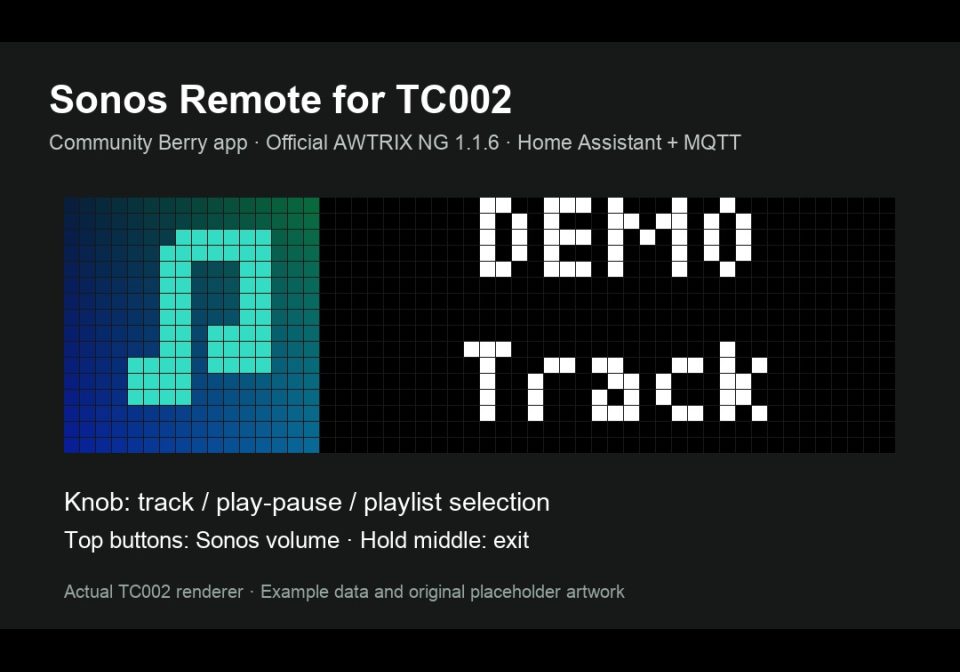
Control a Home Assistant Sonos player with the TC002 knob: tracks, play/pause, volume, ten playlists and native 16×16 album art. Requires HA + MQTT.
- Topic
- Multimedia
- Includes
- Script
Runs on
- Does not run on 32×8 (TC001 & DIY) Made for 52×16 (TC002).
- Runs on 52×16 (TC002)
- Does not run on 32×8 with AWTRIX 3 (TC001 & DIY) Made for AWTRIX NG.
Choose your display in the next step.
Script description
Sonos Remote for TC002 — v3.3.2
A physical Sonos remote for the official AWTRIX NG TC002 (52×16), using Home Assistant's Sonos and MQTT integrations. The clock displays music with artist and title on two lines and available native 16×16 album artwork. Audio stays on Sonos.
New in 3.3.2
Choose Startup screen → Playlists or Now Playing in the app settings. Playlists is the existing default. Now Playing opens current playback without starting a playlist or resuming paused music. Save and reopen the app after changing the setting. Hold the knob to open playlist selection and hold again to cancel.
Setup
Install the app as sonos_remote, together with the required Sonos Playlists and Sonos Artist Names modules. Existing module versions are unchanged. Keep the script names to preserve settings.
Import the Home Assistant blueprint. Configure a Sonos media player, matching MQTT topic root and clock topic prefix. Configure up to ten playlist/favorite slots in Sonos Playlists; each uses Name|content id|content type. For album covers, configure the blueprint's Home Assistant artwork URL reachable from the clock.
Open it from the TC002 Scripts menu or the Web UI Start button. Turn the knob in the picker to browse and click to start the selected item. While playing, turn for previous/next track and click for play/pause. The top left/right buttons adjust Sonos volume; hold to repeat. Hold the top middle button to exit to the AWTRIX carousel. Sonos volume is separate from the TC002 speaker.
Optional global artist abbreviations are configured in Sonos Artist Names. Full names scroll by default; an optional short name appears after the first full pass. Module defaults are empty for a new installation.
Verified on official TC002 firmware 1.2.2: 117 isolated actual Berry runtime assertions and eleven public-release checks passed. No real player controls were sent by those isolated tests.
For a direct Sonos connection without Home Assistant or MQTT, see the separate Sonos Remote Local, with automatic Sonos favorites, saved playlists, radio and player selection.
GitHub and complete setup · Release 3.3.2
Source available under PolyForm Noncommercial 1.0.0. Required Notice: Copyright © Stephan Mühl (Blueforcer) https://github.com/Blueforcer/awtrix-ng
Sign in to view and copy the code of this script.
Discussion 3
Ask a question, suggest a change or share how you use it.
Newest first
Hi @mmeidl78, thanks for your feedback! Yes, opening directly in "Now Playing" makes sense, especially when music is already playing. I’m considering an optional "startup screen setting: Menu / Now Playing". Opening the app would simply display the current playback, without starting music or changing the source. Holding the knob would still open the selection menu. This setting isn’t implemented yet. Meanwhile, would you try "[Sonos Remote Local](https://github.com/lucaamo/tc002-sonos-local)"? It’s our newer, separate community beta, with several additional features: - "Direct connection to Sonos over your local network", without Home Assistant, MQTT, a bridge or a computer running. - "Room selection", with playback controls that respect existing Sonos groups and volume adjustment for the selected room. - "Automatic browsing of Sonos radio favorites and saved playlists", including service playlists saved in Sonos. No manual content IDs required. - "Knob navigation:" previous/next track during music playback, or previous/next favorite station during radio playback. - "16×16 artwork with artist and title", plus radio station names and song information when Sonos provides it. - "Twelve built-in radio logos", with an option to use the original station artwork. - "English/Italian menus", an on-screen controls guide, and no idle timeout. Existing groups are supported; creating groups or stereo pairs isn’t implemented. You can install it from https://awtrix.de/flow/mH4KFyXKLosV including its two required helper modules. Enter the IP address of one Sonos speaker in the app settings and select English. The original HA version can remain installed. Please let me know how it works with your speakers and music sources. Your feedback would also help us decide how the Now Playing startup option should behave.
More scripts in Multimedia
Something wrong with this script? Report it.
Have an idea?
Sign in to ask questions and join the conversation.