ScriptAWTRIX NG
Persona 3 Reload Clock
On an AWTRIX display
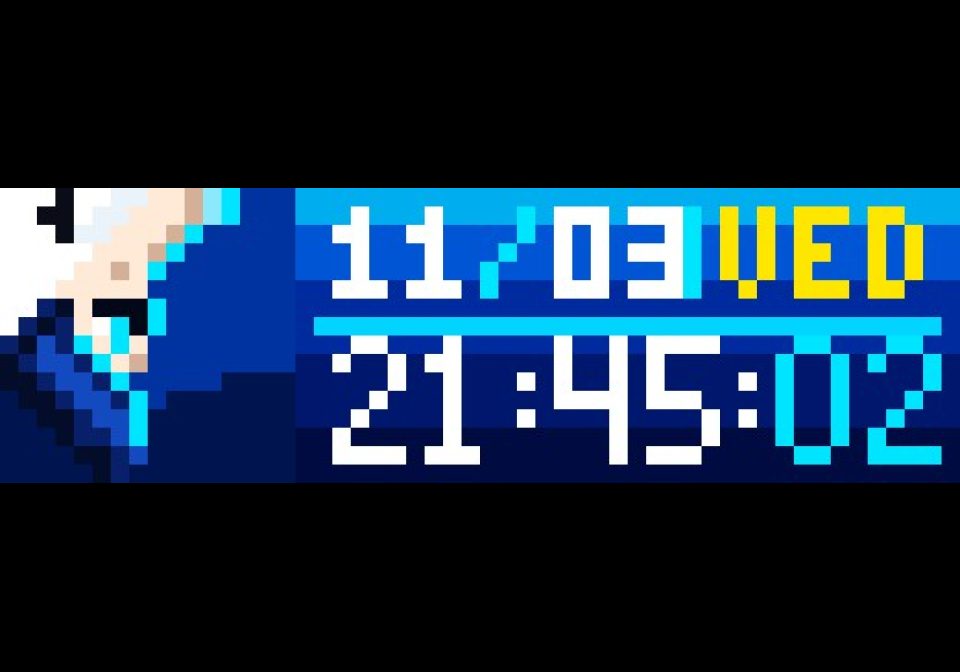




On your display
Iconic Persona 3 Reload underwater clock and calendar for Ulanzi TC002 (52×16 matrix) with Tartarus Dark Hour mode.
Which AWTRIX do you have?
See below where it runs, or choose your device.
- Topic
- Miscellaneous
- Includes
- Script · 1 sound (13.9 KB)
Runs on
- Does not run on 32×8 (TC001 & DIY) Made for 52×16 (TC002). Needs the built-in synthesizer.
- Runs on 52×16 (TC002)
- Does not run on 32×8 with AWTRIX 3 (TC001 & DIY) Made for AWTRIX NG.
Choose your display in the next step.
Script description
Persona 3 Reload Clock for AWTRIX NG
A clock and calendar application inspired by Persona 3 Reload (P3R) underwater visuals, designed for Ulanzi TC002 and 52×16 RGB LED matrix displays running AWTRIX NG.
- GitHub Repository: patw0929/awtrix-p3r-clock
- Target Device: Ulanzi TC002 (52×16 Matrix)
- Firmware: AWTRIX NG (Berry standalone script)
✨ Features
- Normal Mode:
- Left (16×16 Icon): Makoto Yuki underwater pixel art icon.
- Right (36×16 Panel): Ocean blue gradient background with rising ambient bubble particles.
- Top Right: Date (
MM/DD) and weekday indicator (Yellow for weekdays, Red for Sunday). - Bottom Right: Custom 4×7 digital clock (
HH:MM:SS).
- Dark Hour Mode (00:00 ~ 00:59):
- Automatically switches to Tartarus Dark Hour theme at midnight (or can be forced via settings).
- Left (16×16 Icon): Dark Hour Full Moon pixel art icon.
- Right (36×16 Panel): Dark green gradient with neon green clock and red seconds.
- 💥 Interactive Evoker Persona Summon:
- Press the device button (default: middle Select button) to trigger the iconic Persona 3 summoning animation cutscene (Evoker aim, dynamic eye cut-in with sweeping bangs, gunshot muzzle flash, and glass shatter with PERSONA blue flames).
- 🔊 Sound & Voice Support:
- Plays Makoto Yuki's 8-bit "Persona!" summon shout and gunshot SFX.
- Zero-dependency Fallback: If no MP3 is uploaded, it automatically falls back to the TC002's built-in hardware synthesizer (Song Synthesizer) to synthesize the gunshot noise and melody directly from the chip.
- P3 Logo Cycling:
- Alternates the weekday slot with the classic pixel
P3logo every 4 seconds while keeping the date visible.
- Alternates the weekday slot with the classic pixel
- Completely Standalone:
- Written entirely in Berry script (
p3r.be). Runs natively on the ESP32 without MQTT, Home Assistant, or external servers.
- Written entirely in Berry script (
⚙️ App Settings (@config)
Configurable directly from your AWTRIX NG Web UI (Apps -> ⚙️):
| Setting | Type | Default | Description |
|---|---|---|---|
Timezone |
text | Asia/Taipei |
IANA timezone (e.g. Asia/Taipei, Asia/Tokyo, UTC, +8, auto) |
Force Dark Hour |
bool | false |
Force Tartarus Dark Hour green theme regardless of current time |
Cycle P3 Logo |
bool | true |
Alternate weekday slot every 4 seconds with the P3 logo |
Summon Button |
text | select |
Hardware button to trigger summon (select, middle, left, right, or any) |
Enable Sound |
bool | true |
Enable or mute voice line and sound effects during summon |
🎵 Audio Setup Notes
- AWTRIX Hub Install: When installed from the Hub, the companion
persona.mp3audio is bundled and downloaded automatically. - Manual Install: Upload
assets/persona.mp3(pre-formatted to MPEG-1 Layer III 44.1 kHz) via the Web UI Audio tab, or enjoy the built-in hardware synthesizer sound without any extra files!
📄 License
MIT License © 2026 patw
Sign in to view and copy the code of this script.
Community
Discussion 0
Ask a question, suggest a change or share how you use it.
No comments yet. Start the conversation.
More scripts in Miscellaneous
Something wrong with this script? Report it.
Have an idea?
Sign in to ask questions and join the conversation.